

Why in-person ergonomics still matters
There is no substitute for a consultant being physically present when working with employees to reduce work fatigue, discomfort, and pain. The practical outcome is fewer injuries. After a week spent with about 120 employees at a customer service center, I am more convinced than ever that this approach is also how a company proves its commitment to safety and gains employee buy-in.
Injury prevention improves when people trust the process. In-person support can even build loyalty because employees feel seen, heard, and helped.
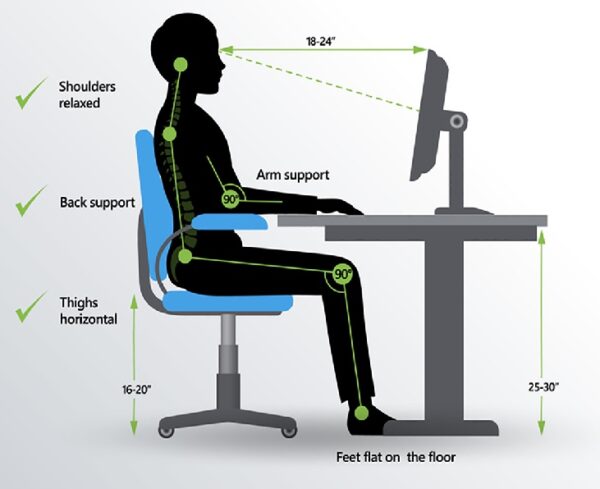
What we learned analyzing 120 workstations
A colleague and I spent four days working with and analyzing nearly 120 workstations. One thing was clear. People do not immediately trust strangers. The presence of the safety manager, facility manager, and supervisors helped employees engage. Even then, employees quickly decide whether you are sincere and actually interested in their situation.
That decision is usually made within two to three minutes. When it happens, you can feel the shift. People open up, ask better questions, and participate in changes that reduce strain.
Technology helps, but it does not replace the human touch
Over the past few years I tried several computer-based training and remote consulting platforms, excited by the potential to scale. The limitation became obvious. Remote tools are not a true substitute for being present at the workstation with the person who is doing the work.
Technology can help gather data and support short-term and long-term recommendations. But the human connection is what earns trust and helps people believe that change will actually help them.
Simple stretches to do during the workday
Try rotating a few of these periodically during your day:
- Step or march in place
- Backward shoulder rolls
- Yawn stretch
- Chest stretch
- Neck flexibility: "yes, no, maybe"
- Chin tuck
- Wrist stretches
Investing in your home office
A home office is an investment in health, comfort, and well-being. Below is an example of an entry-level setup in the $600 range. If you want a simple justification, compare the cost to what you may save in commuting time and expenses, childcare, and meals away from home.
The links below are regular product links with no affiliate tracking.
Adjustable office chair
Chairs, like mattresses, are worth investing in. You spend a lot of time there. Look for adjustable height, adjustable seat pan, arm rests, and a five-star base.
- Example chair: Flash Furniture Mid-Back Chair (B00YB1HONU)
Adjustable height desk
A desk that adjusts height can help you find a more ergonomic setup. A common sitting desktop height is roughly 27 to 31 inches, and a common standing desktop height is roughly 43 to 45 inches.
- Example desk: Furmax Electric Adjustable Standing Desk (B09TJGHL5F)
Anti-glare monitor
Glare contributes to eye strain and muscle fatigue. You can often identify glare by turning off your screen. Aim to place your screen at a 90-degree angle from nearby windows or use shades. Reduce glare from lighting by adjusting brightness and positioning lamps away from the monitor.
As a guideline, position the screen 16 to 30 inches from your eyes, with the top level at or slightly below eye level using the "horizon" test. If you wear bifocals or transition lenses, the monitor usually needs to be lower to avoid neck strain. Take frequent breaks to give your eyes a rest.
- Example monitor: HP Business Monitor (B09NJPFZX5)
Monitor riser
Monitor positioning is a common driver of neck strain. A simple riser can help you dial in height and viewing angle.
- Example riser: Evoomi Monitor Stand (B089B1QHFR)
Adjustable laptop riser
If you use a laptop, avoid keeping it flat on the desk for long periods. A riser can bring the screen closer to eye level. Pair it with a separate keyboard and mouse to reduce wrist and shoulder strain.
- Example riser: Adjustable Laptop Stand (B09PYPPD9L)
Wireless keyboard and mouse
Using a wireless keyboard and mouse with a laptop can reduce fatigue compared to using the built-in keyboard and trackpad for long stretches.
- Example combo: Wireless Keyboard and Mouse (B09N6VYHTX)
Split and sloped keyboard with vertical mouse design
If you are prone to wrist discomfort, a split and sloped keyboard paired with a vertical mouse can be a good option to explore.
- Example set: Kensington Ergonomic Keyboard and Mouse (B07X6J7GVH)
Other items that can help include wrist rests, mouse pads, and carpet pads.
Learn more
If you want to reduce workplace stressors at the source, job-based documentation and clear physical demands are a strong foundation for prevention. Explore DSI's approach on our Job Function Matching page.